Keeping track of live matches, fight nights, and other sporting events can be difficult when schedules change frequently. DAZN reminders provide a convenient way for sports fans to keep an eye on selected upcoming events and receive notifications before they begin. For viewers using DAZN in different markets, the exact sports and streaming rights can vary by location, so checking the event listing for your region remains important.
DAZN’s content schedule lets users view upcoming programming in advance, while individual events can display a reminder option. DAZN states that upcoming scheduled content can be viewed up to 14 days ahead in its content schedule, although availability and programming can vary by market.
For fans following football, boxing, American football, or other live sports, DAZN event reminders can reduce the chance of forgetting an important fixture. This guide explains how reminders work, how to organize your upcoming live sports DAZN schedule, and which notification settings are worth checking.
What Are DAZN Reminders?
DAZN reminders are notifications designed to help viewers remember selected upcoming events. When an eligible event displays the reminder option, users can select the bell icon to receive a push notification before the event begins.
This is particularly useful when a sports fan follows several competitions simultaneously. Instead of repeatedly checking a streaming platform for every event, reminders can provide a more convenient way to keep selected events on your radar.
Depending on the market and account settings, DAZN also provides notification controls that allow users to manage different types of alerts.
What Can You Use Reminders For?
Potential uses include:
- Football fixtures
- Boxing events
- NFL games
- Other scheduled live sports
- Selected upcoming DAZN programming
- Events you specifically want to watch
The availability of individual events depends on DAZN’s programming and sports rights in your region.
DAZN Event Reminders: How to Set One
Setting a reminder is designed to be straightforward. On an eligible event, look for the bell-shaped Set Reminder icon and select it. DAZN’s help documentation explains that the selected event can then trigger a push notification before it starts.
A simple process is:
- Open DAZN or visit the DAZN website.
- Find the upcoming event.
- Check the scheduled start time.
- Select the reminder/bell icon.
- Confirm that notifications are enabled on your device.
- Review your notification settings if alerts are not appearing.
DAZN also states that multiple event reminders can be set, allowing users to track different events rather than limiting themselves to one upcoming match.
Upcoming Live Sports DAZN: Use the Schedule Effectively
The upcoming live sports DAZN schedule can be useful for planning your viewing week. Instead of waiting for a reminder to discover what’s available, check the schedule regularly and identify the events you actually want to watch.
DAZN’s content-schedule guidance indicates that upcoming programming can be viewed in advance, with the schedule showing the event’s planned start time.
For example, a weekly review can help you identify:
- Major football fixtures
- Boxing cards
- NFL games
- Special sporting events
- Events requiring separate purchases
- Replays or catch-up options
This approach can help prevent an overloaded notification list while still keeping important events visible.
DAZN Reminders for Football Fixtures
Football fans often have multiple matches to track across competitions. A reminder can be useful when a match starts at an inconvenient time or when several fixtures are scheduled on the same day.
DAZN also has football-focused notification functionality in some markets. Its Pulse feature, for example, can provide alerts for selected football matches and key moments such as goals, penalties, red cards, and match start or end. Availability varies by market.
Build a Simple Football Viewing Plan
Rather than enabling every available alert, prioritize:
- Your preferred teams
- Important tournament matches
- Rivalry fixtures
- Knockout-stage games
- Matches you specifically intend to watch live
This keeps your sports alerts more relevant and easier to manage.
Fight Schedule and Boxing Reminders
Combat-sports fans often need to plan around event start times, especially when major cards take place at unusual hours.
When browsing a fight schedule, check the event listing carefully because the advertised event time may relate to the overall card rather than the exact start time of a particular fight.
Before setting a reminder, look at:
- Event date
- Listed start time
- Main-card information
- Whether the event is live or on-demand
- Subscription requirements
- PPV status where applicable
DAZN’s content schedule distinguishes live events and PPV programming, with PPV events clearly identified in the schedule.
Sports Alerts vs. Match Notifications
It is useful to distinguish between a reminder for an upcoming event and notifications about something happening during a live event.
Event reminders are primarily useful before an event starts. Other sports alerts can provide updates while matches are underway, depending on the feature and market.
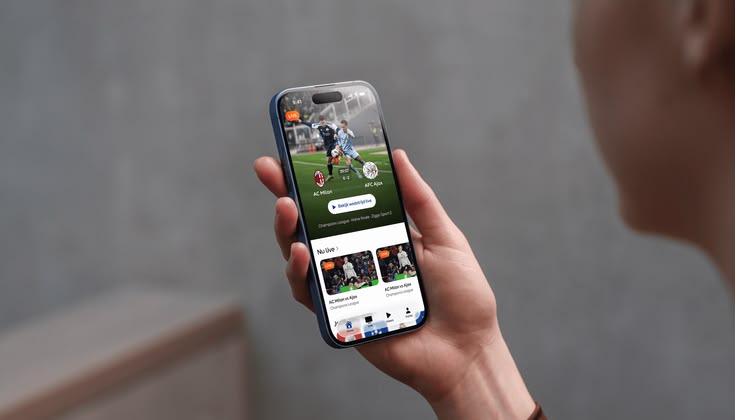
For example, DAZN’s Pulse feature can send interactive football alerts for selected key moments. These include goals, penalties, red cards, shots hitting the post or crossbar, and match start/end.
This means fans can potentially use reminders for planning and live alerts for staying updated once the action begins.
Avoiding Too Many Notifications
More notifications do not necessarily mean a better viewing experience. If every fixture generates an alert, important reminders can become easy to overlook.
A better approach is to create a selective notification routine.
A Practical Notification Strategy
Use reminders for:
- Events you definitely want to watch
- Major games
- Important fight cards
- Matches that occur outside your normal viewing hours
Avoid enabling unnecessary alerts for every event unless you genuinely want comprehensive coverage.
You can also revisit DAZN’s notification controls periodically and turn off categories that are no longer relevant. DAZN provides controls for managing notification preferences through account settings.
Frequently Asked Questions About DAZN Reminders
How do DAZN reminders work?
DAZN reminders allow users to select eligible upcoming events using the reminder/bell icon. A push notification can then alert the user before the scheduled event begins.
Can I set reminders for multiple DAZN events?
Yes. DAZN’s event-reminder guidance states that users can set reminders for multiple events.
Why am I not receiving a DAZN event reminder?
Check that notifications are enabled for both the DAZN app and your device. Also review DAZN’s notification settings and confirm that the particular event supports reminders.
Can I customize DAZN notifications?
DAZN provides notification-management options, including controls for push notifications and other notification types. The exact choices can vary by market and account.
Can DAZN reminders be used for football?
Yes. Eligible football events can have reminder options, while DAZN also offers football-specific alert features in some markets.
Conclusion: Make DAZN Reminders Part of Your Sports Routine
DAZN reminders offer a simple way to stay organized when multiple live events compete for your attention. By selecting important DAZN event reminders, checking the live sports schedule, and managing notification preferences, viewers can create a more focused sports-streaming routine.
For fans following football fixtures, boxing cards, NFL games, and other upcoming live sports DAZN programming, the most effective approach is to combine the event schedule with selective reminders rather than turning on every available alert. Remember that programming and sports rights can differ by country, so always check your local DAZN listing before planning around a specific event.
Ready to keep your next big game or fight on your radar? Explore DAZN’s upcoming sports schedule and set reminders for the events you do not want to miss.