
Welcome back to Shoppesmatch.com, your go-to destination for the latest tools, trends, and strategies to elevate your online business and creator journey!
If you are a creator, educator, coach, or entrepreneur, you already know the value of your expertise. Hosting a paid workshop is one of the most effective ways to monetize your knowledge, build a dedicated community, and establish authority in your niche. But let’s be honest: while teaching and sharing your passion is exhilarating, the administrative work required to get people in the virtual (or physical) door can be exhausting.
Writing captivating event descriptions, brainstorming the perfect click-worthy title, and running effective social media ads used to be hard. In fact, it was the kind of overwhelming administrative headache that kept brilliant creators from ever launching their first event. You’d sit down at your computer, stare at a blank page, and suddenly feel a wave of writer’s block. How do you summarize a two-hour masterclass in a few catchy sentences? How do you write Facebook ads that actually convert?
Enter the game-changer. Eventbrite has completely revolutionized the event creation process by integrating powerful Artificial Intelligence directly into their platform. With Eventbrite’s new AI-powered tools, you can auto-generate event descriptions, brainstorm compelling titles, and create highly converting social media ad copy with just a few clicks.
In this comprehensive guide, we are going to show you exactly how to take your workshop from a simple idea to a fully launched, ticket-selling machine in a matter of minutes. Ready to follow along and launch your first paid workshop? Log in to your Eventbrite Organizer dashboard and let’s get started.
The Struggle of the Modern Creator
Before we dive into the “how,” let’s talk about the “why.” Why is this AI integration such a massive leap forward for creators?
Historically, launching an event required you to wear a dozen different hats. You had to be the subject matter expert, the curriculum designer, the copywriter, the digital marketer, and the customer service representative. For many, the copywriting and marketing phases were the biggest bottlenecks. Hiring a professional copywriter or an ad agency is expensive and usually out of the question for someone just starting out.
As a result, many creators either delayed their launches indefinitely or launched with subpar event pages that failed to capture the true value of their workshop, resulting in dismal ticket sales. Eventbrite recognized this friction point and built a suite of AI tools designed to eliminate the blank page syndrome forever.
Step 1: Brainstorming the Perfect Title with AI
Your event title is your first impression. If it doesn’t grab attention, potential attendees will scroll right past it. But crafting a title that is both informative and catchy is a delicate balancing act.
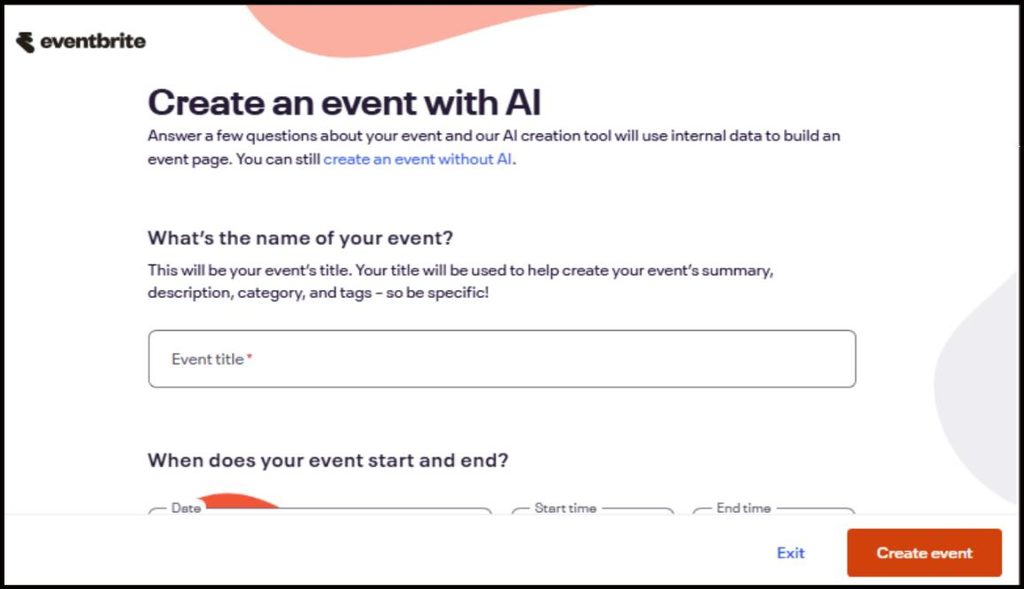
Inside the Eventbrite Organizer dashboard, the AI tools step in to do the heavy lifting. Instead of agonizing over variations of “Intro to Digital Marketing,” you simply input a few basic keywords about your workshop’s core topic, target audience, and desired outcome. The AI then generates a list of optimized, engaging titles tailored to your specific niche.
For example, a prompt like “teaching beginners how to make sourdough bread at home” might generate titles like:
- The Sourdough Starter Kit: Bake Your First Artisan Loaf
- Crust & Crumb: A Beginner’s Guide to Homemade Sourdough
- Mastering Sourdough: From Scratch to Slice in 2 Hours
These titles are structured to drive curiosity and clearly communicate the value proposition, instantly elevating the perceived quality of your workshop.
Step 2: Auto-Generating High-Converting Event Descriptions
Once you have your title, the next hurdle is the event description. A good event description needs to accomplish several things: it must explain what the workshop is about, outline what attendees will learn, highlight why you are the right person to teach it, and create a sense of urgency to buy a ticket.
Using Eventbrite’s AI-powered description generator, this process takes seconds. You provide the AI with a brief prompt, perhaps just a few bullet points covering your main teaching pillars and the overall vibe of the event (e.g., professional, casual, high-energy).
The AI instantly drafts a fully fleshed-out event description, complete with an engaging hook, clearly formatted learning objectives, and a strong call to action (CTA). It structures the text perfectly, using bolding and bullet points to ensure the copy is scannable and easy to read.
The best part? You retain full editorial control. You can tweak the generated text, adjust the tone, add your personal flair, or ask the AI to regenerate specific sections until it perfectly matches your brand voice. What used to take hours of drafting and revising now takes less than five minutes.
Step 3: Crafting Social Media Ad Copy
Having a beautiful, conversion-optimized event page is only half the battle. If nobody knows your workshop exists, nobody is going to buy a ticket. You need to drive traffic to your Eventbrite page, and that usually means leveraging social media and paid advertising.
Writing ad copy is a specialized skill. The text needs to be punchy, platform-specific (what works on LinkedIn might not work on Instagram), and designed to stop the scroll. Eventbrite’s AI tools extend beyond the event page and into your marketing strategy by auto-generating social media ad copy.
Based on the title and description the AI already helped you create, it can generate short-form copy for Instagram, engaging threads for X (formerly Twitter), or professional posts for LinkedIn. It even suggests emojis and layouts that are proven to increase engagement rates. This ensures your marketing message remains consistent from the moment a potential attendee sees your ad to the moment they click “Checkout.”
Step 4: Streamlining the Launch Process
By leveraging these AI tools, the timeline from “idea” to “live event” is drastically compressed. Here is what your new, streamlined workflow looks like:
- Define Your Idea: Decide on the specific problem your workshop will solve for your audience.
- Open the Organizer Dashboard: Navigate to the Eventbrite Organizer dashboard to create a new event.
- Generate the Title & Copy: Use the AI tools to build your title, description, and agenda.
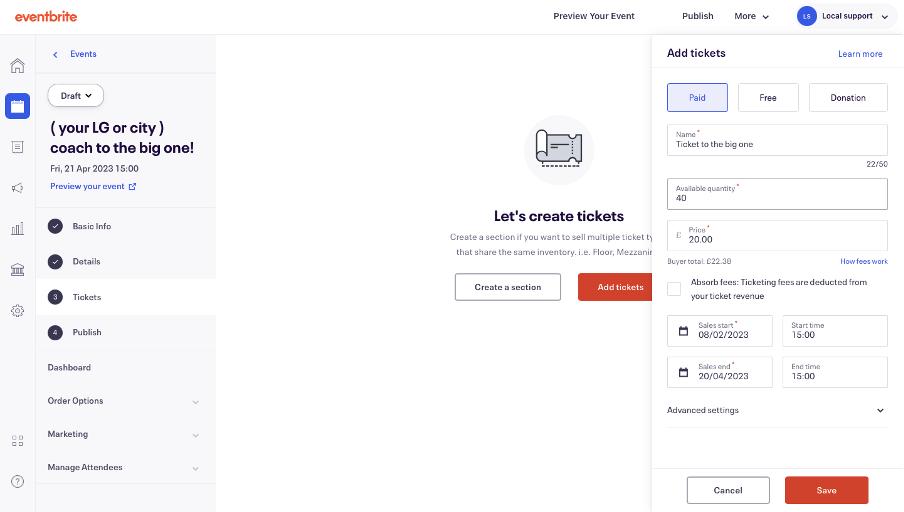
- Set Your Price: Determine your ticketing strategy (early bird, general admission, VIP tiers).
- Publish: Hit the publish button and make your event live.
- Market with AI: Use the generated social media copy to launch your promotional campaigns.
You are no longer spending your energy on administrative setup; instead, you can focus 100% of your energy on what actually matters, preparing incredible content and delivering an unforgettable experience for your attendees.
Final Thoughts for the Shoppesmatch Community
The creator economy is booming, but the landscape is also becoming more competitive. To stand out, you need to be agile, and you need to leverage the best tools available. Eventbrite’s new AI features democratize the event launch process, giving solo creators and small businesses the copywriting and marketing power of a full agency.
Don’t let the fear of copywriting or marketing hold you back from sharing your expertise with the world. Your audience is waiting, and with these new tools, launching your first paid workshop has never been easier.
Frequently Asked Questions (FAQ)
1. Does Eventbrite take a cut of my ticket sales? Yes, Eventbrite does take a fee for hosting your paid events and processing the transactions. The fee structure typically includes a small flat fee per ticket sold plus a percentage of the total ticket price. However, Eventbrite offers a flexible ticketing model: you can choose to absorb these fees into the ticket price (so you pay them out of your revenue) or pass the fees along to your buyers (so the buyer pays the fee on top of the ticket price). Passing the fees to the buyer is a very common practice and allows you to use the platform essentially for free. Note that if you host a free event, Eventbrite does not charge any ticketing fees!
2. Can the AI tool automatically run my Facebook ads? While the core AI tool generates the copy for your ads, Eventbrite offers a dedicated marketing suite called Eventbrite Boost that can actually automate the ad-running process. Eventbrite Boost integrates directly with your Facebook and Instagram accounts. You can use the AI-generated copy and seamlessly launch targeted ad campaigns right from your Eventbrite dashboard. Boost uses smart audience targeting (including retargeting people who have attended your past events or interacted with your page) to ensure your ads are shown to the people most likely to buy a ticket, maximizing your return on ad spend.