We have all been there. It is 11:30 PM on a Tuesday, and the soft glow of your phone illuminates a bedroom that feels just a little too bland. You are deep in the trenches of Pinterest, falling down a rabbit hole of perfectly styled, sun-drenched living rooms and impeccably curated reading nooks. You pin a velvet mustard sofa. Then, a matte black industrial coffee table. Next, a set of airy, bohemian rattan chairs.
Individually, these items are stunning. But fast forward to delivery day, and the reality of your living room looks less like a cohesive designer sanctuary and more like a chaotic furniture garage sale.
Welcome to the Pinterest Plateau. It is the frustrating gap between gathering inspiration and actually executing a room design that feels authentic, intentional, and, most importantly, livable. Pinning is merely collecting; it is not designing. To cross the bridge from saving pretty pictures to confidently clicking “add to cart,” you need a testing ground. You need a way to visualize how the rough linen of a curtain interacts with the glossy finish of a ceramic lamp before a single dollar is spent.
Moving beyond the endless scroll means taking control of your design process. This is where the magic of digital visualization comes into play. If you want to stop guessing and start designing, it is time to find your signature style with Planner 5D mood boards.
Enter the Mood Board: Your Decorating North Star
A true mood board is not just a collage of things you like. It is a strategic, visual roadmap. It is the North Star that keeps you on track when you are standing in a home decor store, tempted by a trendy patterned rug that you know does not fit your overall vision.
While traditional mood boards involve cutting out magazine clippings or arranging flat image files on a blank screen, Planner 5D elevates this process entirely. As a robust design tool, it allows DIY decorators to move past flat, static collages. Instead, you can pull authentic textures, match exact paint colors, and source 3D representations of furniture to see how they physically interact within a defined space.
It is the ultimate “try before you buy” experience. Here is the comprehensive guide to building a Planner 5D mood board that will help you unearth your true signature style.
Step 1: The Brain Dump and Pattern Recognition
Before you open Planner 5D, you must first decode the visual data you have already collected. Open your existing Pinterest boards or Instagram saved folders and ruthlessly audit them.
Look for the invisible threads connecting your favorite spaces. You might think your style is all over the place, but if you look closely, patterns will emerge.
- Color Dominance: Are you naturally drawn to moody, saturated jewel tones, or do you consistently save bright, neutral spaces with high-contrast black accents?
- Material Preferences: Do you favor the warmth of natural walnut and woven rattan, or the sleek coolness of marble, glass, and chrome?
- Shape and Silhouette: Are the sofas you save characterized by structured, mid-century straight lines, or are they plush, overstuffed, and curved?
Jot down three to four descriptive words that define this recurring theme. “Warm, Minimalist, Earthy” or “Moody, Eclectic, Vintage.” These words will become the foundational boundaries for your Planner 5D mood board.
Step 2: Setting the Stage in Planner 5D
Now, transition into Planner 5D. Rather than immediately building a full 3D room with precise architectural measurements, treat your initial project as a blank 3D canvas, a sandbox dedicated solely to your mood board elements.
Establishing Your Palette
Start by anchoring your board with color. Every successful room design relies on a balanced color palette. A professional trick is to use the 60-30-10 Rule:
- 60% Dominant Color: This is usually your wall color or the largest anchor pieces in the room.
- 30% Secondary Color: This provides contrast and interest (upholstery, rugs, or painted furniture).
- 10% Accent Color: The pop of character (throw pillows, artwork, or smaller decor items).
In Planner 5D, use the customization tools to apply these colors to basic shapes or wall segments in your sandbox. This allows you to view the exact hex codes and paint shades next to one another. If the undertones clash on the digital screen, they will absolutely clash in your living room. Fix the palette here before you ever touch a paintbrush.
Step 3: The Tactile Test – Layering Textures
A room with a perfect color palette can still feel entirely flat and lifeless if it lacks texture. Texture is what gives a space its soul. It is the difference between a room that feels like a sterile furniture showroom and a room that feels like a welcoming home.
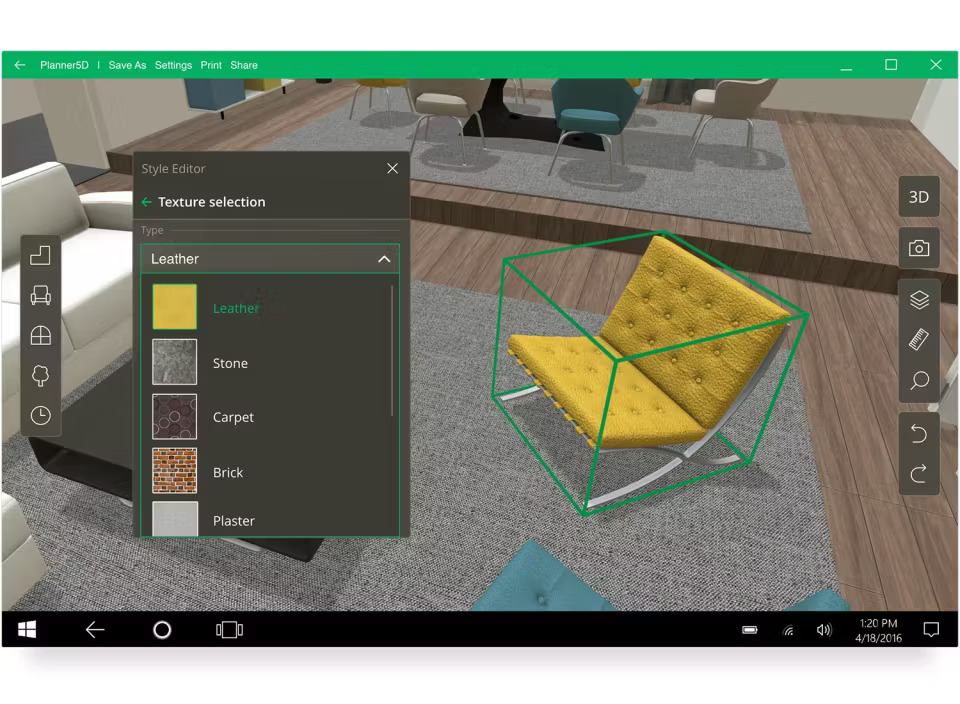
One of the greatest advantages of using Planner 5D over a standard image collage app is the ability to manipulate and visualize surface materials. You are not just looking at a picture of a chair; you are looking at a 3D object wrapped in a specific material.
Achieving Tactile Balance
When pulling items into your mood board, actively look to balance opposites:
- Hard vs. Soft: Pair a sleek, mirrored coffee table with a chunky, hand-knit wool rug.
- Matte vs. Glossy: Contrast matte, chalk-painted walls with the reflective shine of glazed ceramic table lamps or polished brass hardware.
- Smooth vs. Rough: Place smooth velvet throw pillows on a distressed, top-grain leather armchair.
Use the materials library in Planner 5D to swap out the finishes on the furniture you select. Change a standard wood floor to a rich herringbone, or swap a linen sofa cover for rich bouclé. Seeing these textures interact digitally helps you understand the visual weight of the room. Too many heavy, rough textures will make a room feel dark and oppressive, while too many smooth, glossy textures will make it feel cold and uninviting.
Step 4: Sourcing Specifics and Checking Scale
This is where the DIY decorator truly saves money and avoids the hassle of return shipping. Once your colors and textures are harmonizing, it is time to pull in specific furniture pieces that mimic what you plan to buy.
Planner 5D features an extensive catalog of furniture and decor items. While you might not find the exact proprietary lamp from your favorite boutique, you will find incredibly close approximations.
The Anchor Piece Strategy
Always start your mood board by placing the largest, most expensive items first, the “Anchor Pieces.” In a living room, this is the sofa and the area rug. In a bedroom, it is the bed frame and the dresser.
- Drop in the Anchor: Select a sofa in Planner 5D that matches the shape, color, and texture of the one you want to purchase.
- Layer the Secondary Pieces: Add the coffee table, the accent chairs, and the media console.
- Evaluate the Scale: Look at the relationship between the items. Does the delicate, spindly-legged coffee table look ridiculous next to the massive, overstuffed sectional? Does the rug actually extend past the edges of the furniture grouping, or does it look like a postage stamp floating in the center of the room?
By placing these 3D models together, you immediately spot scale discrepancies that a flat Pinterest board hides.
Step 5: The Art of Restraint (Editing Your Board)
Legendary fashion designer Coco Chanel famously advised looking in the mirror and taking one accessory off before leaving the house. The exact same rule applies to interior design.
As you build your Planner 5D mood board, you will inevitably suffer from “feature creep.” You will want to add the brass mirror, and the patterned wallpaper, and the bold rug, and the gallery wall.
Once your board feels complete, take a step back. Walk away from your screen for an hour. When you return, look at the mood board with fresh eyes. Where does your eye immediately jump? Is the space visually exhausting?
If the room feels chaotic, begin the editing process. Mute a loud texture, swap a heavily patterned rug for a subtle solid, or remove an unnecessary piece of accent furniture entirely. Your signature style is not just about what you choose to include; it is equally defined by what you have the restraint to leave out.
Stepping Into Your Signature Space
Finding your signature style is a journey of self-discovery, but it does not have to be a journey of expensive mistakes. By moving your ideas out of the chaotic, boundless realm of social media and into the structured, realistic environment of a Planner 5D mood board, you take ownership of your space.
You transition from guessing to knowing. You can confidently walk into a home goods store, look at a beautiful but trendy armchair, and think, “I love this, but I know it clashes with the undertones of my anchor pieces, so I will leave it here.” Designing a home should be an empowering, creative experience. By pulling your textures, colors, and furniture into a cohesive digital plan before buying a single item, you are protecting your budget, your sanity, and your vision. You are no longer just recreating someone else’s aesthetic; you are masterfully crafting your own.