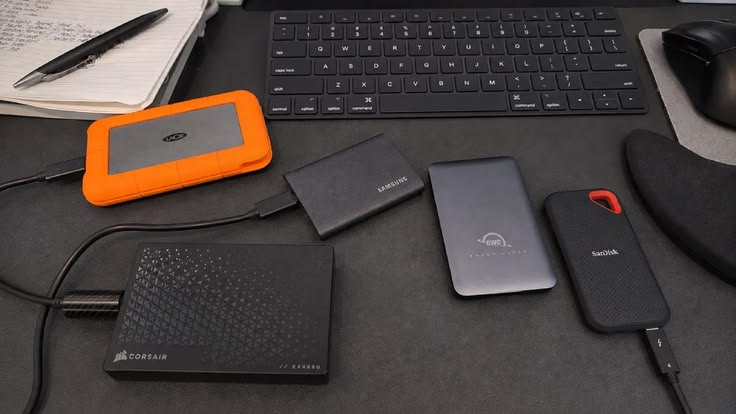
Keeping important files safe is essential for students, professionals, photographers, and families. Back Market España external hard drives offer a way to compare refurbished storage devices for backing up documents, photos, videos, and other digital files without necessarily paying the full price of a new product. Options may include traditional external HDDs for larger storage needs and portable external SSDs for faster file transfers.
For users in Spain, an external drive can provide extra storage for a laptop, desktop computer, or compatible device. However, choosing the right model involves more than comparing prices. Storage capacity, USB-C connectivity, transfer speeds, portability, and the condition of the drive all matter. This guide explains how to compare refurbished external hard drives Spain shoppers may find on Back Market and select a practical option for everyday data backup.
Why Consider Back Market España External Hard Drives?
Back Market is a marketplace that connects customers with professional refurbishers. Its Spanish external-drive category has featured products from brands such as Western Digital, Seagate, Toshiba, SanDisk, Crucial, and Orico. Models, capacities, prices, and availability can change, so check the current listings before purchasing.
The marketplace advertises a two-year commercial warranty and a 30-day trial period in Spain, subject to the applicable terms. Read the specific product and order conditions to understand your coverage.
Potential advantages include:
- More affordable options: Some refurbished models cost less than comparable new products.
- Different storage formats: Compare external HDDs and external SSDs according to your needs.
- Portable designs: Many drives are small enough to carry between home, university, and work.
- A more resource-conscious choice: Buying refurbished can extend the useful life of existing electronics.
A refurbished drive should still be checked carefully. Review the model number, storage capacity, connector type, product condition, included cable, and seller details rather than relying only on the product title.
External HDD vs External SSD: Which Is Better?
Understanding the difference between an external HDD and an external SSD is the first step towards choosing suitable Back Market storage devices.
External HDDs for Higher Storage Capacity
External hard disk drives use spinning magnetic disks to store data. They can be a practical option for users who need substantial space for archived documents, media collections, or regular backups.
Consider an external HDD if you want to:
- Store large photo and video libraries.
- Keep older projects that are not accessed every day.
- Back up a computer without spending more than necessary.
- Carry additional storage between different work locations.
Because HDDs contain moving parts, they are more sensitive to drops and physical shocks while operating. Handle them carefully and avoid disconnecting them during file transfers.

External SSDs for Speed and Portability
External solid-state drives store data on flash memory and have no moving mechanical parts. They are often faster and more resistant to everyday movement than traditional HDDs, although durability depends on the specific product.
An external SSD may be suitable for:
- Transferring large video files frequently.
- Working with photo-editing projects.
- Moving files between compatible laptops.
- Travelling with a compact storage device.
For creators and professionals, an SSD can save time during repeated transfers. However, compare the price per terabyte and your actual workload before choosing one over an HDD.
Choose the Right Storage Capacity
Storage capacity determines how much data a drive can hold. The best choice depends on the size of your existing files and how much additional space you expect to need.
As a general guide:
- 500 GB: Suitable for smaller document collections and limited backups.
- 1 TB: A practical starting point for everyday files, photos, and selected video projects.
- 2 TB: Useful for larger media libraries and regular computer backups.
- 4 TB or more: Worth considering for extensive archives and large video collections.
These are planning guidelines, not exact limits. Operating systems, formatting, and file sizes affect usable capacity. If you regularly create high-resolution videos or RAW photographs, estimate your current storage use before buying.
When comparing Back Market España external hard drives, consider leaving extra room for future files. A drive that is almost full offers less flexibility for new backups.
Check USB-C Connectivity and File Transfer Speeds
The connector and interface influence how easily a drive works with your devices. Some portable storage devices use USB-A, while newer models may support USB-C. The connector alone does not determine speed: the drive and the computer must support compatible data-transfer standards.
Before purchasing, check:
- Whether your computer has USB-A, USB-C, or both.
- The interface and maximum transfer speed supported by the drive.
- Whether the required cable is included.
- Whether an adapter is needed for your setup.
- Compatibility with your operating system and intended devices.
A fast external SSD connected through a slower port may not reach its advertised maximum speed. Actual file transfer speeds also depend on file sizes, the host device, and the drive’s condition.
For users in Madrid, Barcelona, Valencia, or elsewhere in Spain who work across multiple devices, a compatible connector can make daily transfers simpler. Confirm compatibility before ordering rather than assuming every USB-C drive works at full speed with every computer.
Use External Drives for Reliable Data Backup
The Backmarket external drive is useful for backup, but buying one is only the beginning. A reliable backup routine should make it easy to recover files if a laptop fails, a device is lost, or data is accidentally deleted.
Follow these habits:
- Back up important files on a regular schedule.
- Use built-in backup tools or reputable software compatible with your operating system.
- Disconnect the drive after backups when it is not needed.
- Keep the drive away from moisture, excessive heat, and physical impacts.
- Test your backups by opening or restoring selected files.
For especially important data, avoid relying on one drive alone. A second backup stored separately or a secure cloud backup can reduce the risk of losing everything if the external drive fails or is stolen.
If a drive contains sensitive information, consider encryption and protect access with a strong password where supported.

How to Choose Refurbished External Hard Drives Spain Buyers Can Trust
A refurbished storage device may offer good value, but the exact condition and seller details deserve attention. Back Market’s listings identify the product type, connector, capacity, and refurbisher for many products.
Use this checklist before purchasing:
- Verify the model: Confirm the manufacturer and exact model number.
- Check capacity: Make sure the listed storage meets your needs.
- Review connectivity: Confirm the drive and cable work with your devices.
- Inspect condition details: Read the refurbisher’s description and available product information.
- Check included accessories: Confirm whether the cable or adapter is supplied.
- Review warranty and returns: Understand the applicable coverage and trial conditions.
- Test after delivery: Check that the drive is detected, copy test files, and verify that they open correctly.
For drives used to store irreplaceable files, ask about testing or health information if it is not clearly provided. Do not assume every refurbished HDD has a new mechanism or that every SSD has the same remaining write endurance.
Frequently Asked Questions
1. Are Back Market España external hard drives refurbished?
Yes. The marketplace lists external HDDs and SSDs sold through professional refurbishers. Product condition, model, capacity, and included accessories vary by listing.
2. Is an external SSD better than an external HDD?
An SSD is generally better for speed and portability, while an HDD can offer more capacity for the money. The right choice depends on your workload, budget, and storage needs.
3. How much storage capacity do I need for backups?
For many everyday users, 1 TB or 2 TB is a reasonable starting point. Larger photo and video libraries may need 4 TB or more. Estimate your current files and future needs before choosing.
4. Do refurbished external drives come with a warranty?
Back Market Spain advertises a two-year commercial warranty, but buyers should check the terms that apply to their specific order and product.
5. Can I use an external drive with both Windows and Mac?
Often, yes, but compatibility depends on the drive’s file system and the tasks you need to perform. You may need to reformat it, which erases existing data, so back up any files first.
6. Are discos duros externos reacondicionados suitable for important backups?
They can be useful, provided the drive is properly checked and tested. For critical files, maintain a second independent backup rather than trusting a single storage device.
Conclusion: Choose Storage That Protects Your Digital Life
Back Market España external hard drives provide a starting point for comparing refurbished storage solutions for home, study, and professional use. External HDDs can suit larger archives, while external SSDs offer speed and portability for demanding workflows.
Before buying, compare capacity, connector compatibility, transfer speeds, condition, included accessories, and warranty terms. Once your drive arrives, test it and establish a regular backup routine. For important data, keep an additional copy in a separate location.
Ready to compare your options? Explore Back Market España external hard drives to find refurbished storage devices that match your capacity, connectivity, and backup requirements.